
Skip to content
Platform guide / For coaches

Workout programming with a person behind the plan

Build workout templates and programmes, assign training to clients and review their logged sets with Coachtrax fitness coaching tools.

Explore the workflow
Illustrative trainer guiding a client through a dumbbell row
Inside a training week

A plan you can actually follow.

  1. Build a template
  2. Assign the workout
  3. Review logged sets
Coach Marcus · Strength blockWeek 3/8

Push A

Next up · 3 exercises

M
T
W
T
F
S
S
Barbell bench press
3×10 · 60 kg
Seated cable row
3×12 · 45 kg
Dumbbell shoulder press
3×10 · 16 kg
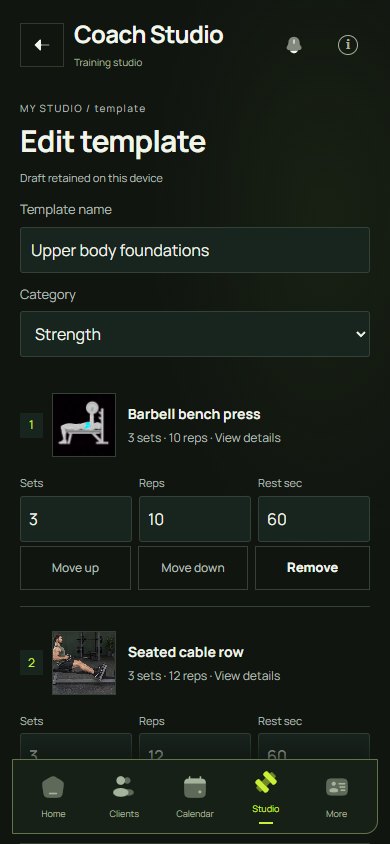
A populated coach workout template with exercise prescriptions.
Short answerCoachtrax lets fitness coaches build workout templates and multi-week programmes from a library of more than 2,700 exercises, assign them to one client or many, and review every set the client logs. The client follows the plan in the app, and the coach adjusts it from real training records rather than a weekly summary.

Build a starting point. Make it personal.

A reusable template is useful when it saves setup without erasing the individual. Coachtrax lets coaches organise exercises into workouts and programmes, then assign training to clients. Start with the structure you know, and adjust the prescription for the person, equipment and schedule in front of you.

Put it into practiceExercise instructions and the appropriate measurements belong together. Depending on the movement, that might mean sets and reps, time, distance or load. A clear prescription gives the client something specific to follow and the coach a useful record to review.

Keep the plan connected to the session

Clients can open their training, log their work and return to their workout history. Coaches can use those records to discuss what actually happened instead of relying on a vague summary at the end of the week.

Put it into practiceFor example, a client might complete the first two sessions and miss the third. The next conversation can address scheduling or exercise choice before increasing the workload. A logged session is context for coaching, not proof that a programme was right for everyone.

A repeatable coaching rhythm

Create a template, assign the programme, agree when the client will train, then review completed sessions. Keep notes specific: which movement felt awkward, which set changed, and what needs attention next time.

Put it into practiceConnect this workflow with progress tracking and messaging. Coachtrax keeps the training record close to the ongoing relationship; the coach still makes the decisions and adapts the plan.

Questions answered

Can I build workout programmes for clients in Coachtrax?

Yes. Coaches create reusable workout templates, combine them into programmes and assign them to individual clients or several clients at once. Each exercise can be prescribed by sets and reps, time, distance or load.

How many exercises are in the Coachtrax library?

More than 2,700 illustrated exercises across disciplines including strength, HIIT, CrossFit, HYROX, yoga, Pilates, calisthenics, mobility and cardio. Coaches can also add their own.

Can clients log their workouts against the coach’s plan?

Yes. Clients open the assigned workout, log their sets and reps, and the completed session appears in the history their coach reviews.


Your next move

Bring your coaching
closer to your clients.

Explore the tools for your next programme, conversation and session.

Explore coaching with Coachtrax Understand pricing first